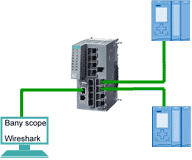
Introduction to Ethernet Diagnostics Wireshark is a powerful Ethernet diagnostic tool that can quickly identify problems by capturing and analyzing messages. In industrial networks like the SIMATIC network, capturing messages for analysis is essential for troubleshooting and performance optimization. Two hardware modules commonly used for this purpose are the managed switch, such as the SCALANCE X208, and the BUS ANALYZER XM module, like the XM-400 module. Below, we explore how these tools are positioned within the network and their differences in capturing messages between two S7-1500 PLCs.
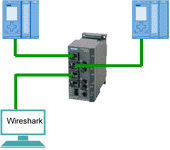
Using Managed Switches for Capturing Messages To capture communication data between S7-1500 PLCs, a managed switch employs the port mirroring function. For example:
- Set Port 1 as the Monitored Port.
- Set Port 3 as the Monitor Port.
With this setup, data flowing through Port 1 is mirrored to Port 3, allowing it to be captured for analysis. However, this method has several limitations:
- Error Message Loss: The switch’s mechanism discards error messages, preventing them from being captured.
- Bandwidth Constraints: If the interaction bandwidth between Port 1 and Port 2 is 200 Mbps, mirroring to Port 3 limits the effective bandwidth to 100 Mbps. When network load exceeds 50 Mbps, captured messages may be distorted.
- PN IO Message Setup: Capturing PN IO messages requires configuring the PC’s NIC to detect VLAN tags.
- Incompatibility with PN IRT Messages: PN IRT messages cannot be captured unless an IRT switch is used, and even then, only one side (sent or received) can be captured.
- Order Accuracy Issues: Port mirroring may disrupt the correct sequence of packets, such as during the TCP three-way handshake.
For example, mirroring might result in an incorrect TCP handshake sequence, with altered SYN and SYN-ACK packet orders. Despite these drawbacks, managed switches remain a cost-effective and widely available option for capturing packets in an industrial network.


Using BUS ANALYZER XM Modules The BUS ANALYZER XM module provides a more precise solution for capturing messages. With integrated TAP (Test Access Point) technology and Bany Scope software, this hardware eliminates many of the limitations associated with managed switches:
- Accurate Capturing: TAP ensures that captured packets are accurate and unaltered.
- Error Message Retention: Unlike switches, the XM module captures error messages without loss.
- No Bandwidth Reduction: The module does not impose bandwidth constraints on the network.
- Support for VLAN Tags: VLAN-tagged packets are captured without additional setup.
- PN IRT Message Compatibility: TAP allows capturing both sent and received data for PN IRT messages simultaneously.
However, the BUS ANALYZER XM module has its own limitation:
- It cannot accurately capture device data during power-up. For instance, if you need to capture data during PLC power-up, an additional switch must be added between the PLC and the XM module.
Conclusion Both SCALANCE X208 managed switches and BUS ANALYZER XM modules have their strengths and limitations when capturing network messages. While switches offer a cost-effective and widely available solution, they come with bandwidth and accuracy challenges. On the other hand, the XM module provides precise packet capturing but may require additional setup for certain scenarios.
By understanding the capabilities and constraints of these tools, network engineers can choose the best approach for Industrial Ethernet diagnostics, ensuring efficient troubleshooting and performance optimization in SIMATIC networks.