SIEMENS
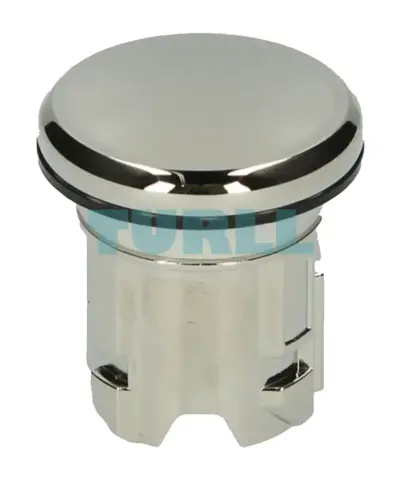
Siemens 3SU1950-0FA80-0AA0 Sealing Plug 22mm Metal, Shiny Silver Original Brand New
3SU1950-0FA80-0AA0
Original price was: $5.65.$2.29Current price is: $2.29.
In stock
Siemens SIMIT Simulation Platform V11.1 Software Engineering S license term: 1 year floating license for 1 user engineering software without software, without documentation, class A, 2 languages (de, en), executable in Windows 10 (21H2), Windows 10 LTSC 2019, Windows Server 2016 / 2019, for more information, see SIMIT V11.1 Readme, reference hardware: PC/PG content: 1x certificate order only in connection with: 6DL8900-7XX00-0XB8-Z Y01Y02
Siemens SIMIT Simulation Platform V11.1 Software Engineering S license term: 1 year floating license for 1 user engineering software without software, without documentation, class A, 2 languages (de, en), executable in Windows 10 (21H2), Windows 10 LTSC 2019, Windows Server 2016 / 2019, for more information, see SIMIT V11.1 Readme, reference hardware: PC/PG content: 1x certificate order only in connection with: 6DL8900-7XX00-0XB8-Z Y01Y02
Bringing products to the market faster and with consistently high quality requires an optimized engineering workflow in the automation and the shortest possible assembly and commissioning times for new production lines. The SIMIT simulation software permits real-time simulation and emulation for comprehensive examination of automation solutions.
SIMIT is based on a uniform simulation platform that enables not only the virtual commissioning of the automation engineering of systems, machines and processes, but also realistic training environments for plant operators. This can be easily done directly at the workplace, even without requiring equipment or the need for in-depth knowledge of simulation. Either a real or virtual automation system is used for the control, for example, the SIMIT Virtual Controller.
SIMIT Virtual Controller instances can emulate the SIMATIC S7‑300/S7‑400 automation systems from the SIMATIC S7 and SIMATIC PCS 7 product range used in an automation project.
Many efficient tests for detection and elimination of potential faults can already be carried out before the real plant is even available, e.g.:
In this manner it is possible to optimize the quality of the configuration process without a risk for the real plant.
Note:
SIMIT V11.1 can be used in combination with the following products:
Notice: Please observe compatibility.
SIMIT runs on the latest notebooks or desktop computers with the Microsoft Windows operating system as well as on virtual systems (VMware ESXi Server V7.0). Flexible application is possible and integration is possible via open interfaces into the factory automation with SIMATIC S7 and SIMATIC WinCC or into the process automation with SIMATIC PCS 7 or SIMATIC PCS neo.
Since the models can be calculated in real time, SIMIT can be linked to the actual automation engineering ("hardware-in-the-loop"), using the SIMIT unit for connection via the PROFINET or PROFIBUS interfaces. A "software-in-the-loop" test is also possible through virtualization of the automation system using the S7‑PLCSIM or S7‑PLCSIM Advanced emulation software, or the integrated SIMIT Virtual Controller.
Interfacing to the real automation system is usually made via PROFIBUS DP or PROFINET IO, With interface modules (SIMIT units) which simulate the devices on PROFIBUS DP/PROFINET IO.
Additional simulation models can be coupled to SIMIT:
In the case of coupling via the remote control interface, SIMIT can be either the master or client (slave) for other simulations. Using virtual time management, simulations can also be implemented faster or slower than in real-time.
SIMIT can be perfectly adapted to individual requirements with four different software packages to suit the project size:
|
SIMIT Engineering S |
4 000 simulation tags |
|
SIMIT Engineering M |
16 500 simulation tags |
|
SIMIT Engineering L |
200 000 simulation tags |
|
SIMIT Engineering XL |
1 000 000 simulation tags |
SIMIT Engineering S - XL functional scope
The following extension libraries make available specific technological components:
SIMIT Component Type Editor
For creating library components according to your own requirements and functional expectations.
Component-based, signal flow oriented modeling of the plant is performed through the graphical user interface of SIMIT supported by expandable base libraries. For this, pre-defined components are selected from the library, placed on the graphic interface, connected with one another, and parameters are set. Beyond this, the simulation model can be generated with an export of the engineering data from COMOS. Special simulation skills are not required.
The efficient simulation is based on the abstraction at three different levels: Signals, devices (e.g. actuators and sensors) and technological response. Here, the technological response is represented mathematically and logically or by additive libraries.
The signal couplings can be created easily by importing the symbol table or a list of signal names. Files of the Import/Export Assistant, Control Module (CM) files (SIMATIC PCS 7), or suitable Microsoft Excel files (SIMATIC S7) can be used together with simulation templates from the base library to simulate the devices.
Additive libraries support the simulation of the technological response and round off the SIMIT offer:
SIMIT supports two types of virtual commissioning:
Software in the loop: Pretesting without a physical plant
When SIMIT is used in conjunction with the Virtual Controller or coupled to the S7‑PLCSIM or S7-PLCSIM Advanced emulation software, the automation function can be tested in advance in the engineering office without the physical hardware – from the sensor through the automation system and back down to the actuator.
The user program is loaded in SIMATIC Manager into the automation system emulated by the SIMIT Virtual Controller, S7‑PLCSIM or S7‑PLCSIM Advanced without modifications and started. It obtains the simulated I/O signals via the coupling of the emulated automation system from SIMIT.
Hardware in the loop: Factory Acceptance Test (FAT)
The physical automation systems are loaded with the user program for the Factory Acceptance Test (FAT). SIMIT simulates the I/O signals, instrumentation and field devices. The simulation values are sent as message frames to the automation systems via the hardware interface modules (simulation unit). When SIMIT also simulates the technological response of the plant, the FAT becomes a plant test. Commissioning can be performed on the virtual process in an early phase of the project.
You or your customers require a simulation solution based on SIMIT and the automation (SIMATIC S7, SIMATIC PCS 7 and SPPA-T3000) with specific properties for Hardware-in-the-Loop or Software-in-the-Loop. We execute the projects for you and achieve the best results possible based on our decades of experience with simulation projects. We offer:
You or your customers require support or training for a simulation project based on SIMIT and the automation (SIMATIC S7/PCS 7) with specific properties for Hardware-in-the-Loop or Software-in-the-Loop. To help you complete your task optimally, we can support and advise you during the corresponding phases of the automation project using our decades of experience in simulation projects. You can also have our experts support you with your simulation from the planning phase to project setup right up to automation testing. We offer:
The option of renting portfolio elements from the range of SIMIT products reduces the costs for a simulation environment. If these components are required for validation or testing of the automation for only a limited time, it is often more economical to rent them. The rental components are always supplied with the latest hardware and software versions. We offer:
Visit 6DL8913-0AL10-0BB5
For more our products visit turll.com
| SKU / Model | 6DL8913-0AL10-0BB5 |
|---|---|
| Weight | 0.008 kg |
| Dimensions | 1 × 1 × 1 mm |
Request a quote for project quantities, discontinued or obsolete models, and pro-forma invoice / bank transfer orders. Our sourcing team responds fast.