SIEMENS
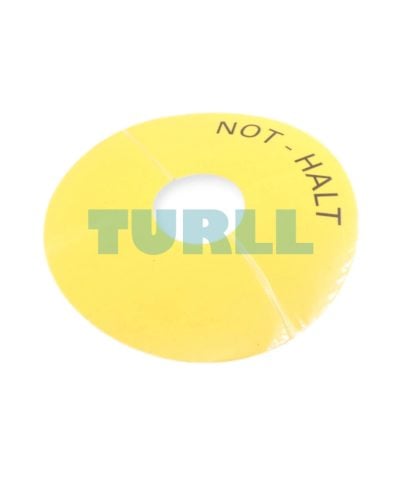
Siemens 3SU1900-0BC31-0AT0 Emergency Stop Backing Plate, Yellow, Self-Adhesive, 75mm Original Brand New
3SU1900-0BC31-0AT0
Original price was: $5.84.$2.36Current price is: $2.36.
In stock

Siemens SIMATIC S7, STEP 7 Basic, Software Update Service within the framework of this contract, you will receive for one year all up-to-date software versions. the contract is extended automatically by 1 year if it is not canceled 3 months prior to expiration. Period of delivery and service: 1 year from date of invoice Requirement for conclusion: current version of the software
SIMATIC STEP 7 Basic V19 is the engineering system for the SIMATIC S7-1200.
STEP 7 Basic V19 is based on the Totally Integrated Automation Portal (TIA Portal) central engineering framework which offers users a uniform, efficient and intuitive solution to all automation tasks.
You can find more information on the Software Update Service, license types, Online Software Delivery and handling your SW licenses with the Automation License Manager under this link.
SIMATIC STEP 7 Basic V19 is the easy-to-use engineering system for the modular SIMATIC S7-1200 micro PLC as well as the associated I/O. It contains PLCSIM for simulation purposes and SIMATIC WinCC Basic for configuring the SIMATIC Basic Panels.
STEP 7 Basic V19 thus provides support in all phases of the automation project with SIMATIC S7-1200:
STEP 7 Basic V19 provides powerful programming editors with optimized compilers for programming the S7-1200 controllers.
The Trace Editor makes it possible to record signals in chronological order from the user program of an S7-1200 CPU. The graphical evaluation of the signals simplifies the commissioning of drives, for example, and helps search for sporadic errors in the application or user program.
With the S7-PLCSIM simulator, the function of the STEP 7 projects can be tested without any changes. The blocks can be monitored online as in the real control system and signals can be set. For this purpose, the TIA Portal's own functions can be used as well as the functions included in PLCSIM, such as simulation tables, fault simulation and step-by-step (sequence) functions.
Motion Control applications with SIMATIC STEP 7 Basic V19 and S7-1200 become child's play, even for beginners. The intuitive graphical user interfaces of the technology objects in STEP 7 Basic V19 offer the best support for the configuration and commissioning of PTO/PTI, analog and PROFIdrive-capable drives, as well as for troubleshooting. The instructions for controlling the motion sequence are standardized according to PLCopen Motion Control. The following functions are supported in STEP 7 Basic V19:
The system has a comprehensive library concept for the reuse and simple standardization of frequently used program sections.
Elements such as blocks, tags, alarms, HMI graphics, graphic objects, individual modules or entire stations can be stored along with their parameter assignment in local or global libraries. This means that these elements are available for further programming tasks.
STEP 7 Basic V19 comes with password-based know-how protection and write protection against unauthorized read-out and modification of program block content.
Copy protection offers greater protection against unauthorized copying of program blocks. These blocks can be linked to the serial number of a memory card so that the block can only run if the configured memory card is inserted into the CPU.
In addition, multiple user groups with different access rights can be assigned to the controller by means of four different authorization levels.
Improved manipulation protection offers a greater degree of security against unauthorized changes to the data transferred between STEP 7 and the controller.
Several individuals frequently work on the same project simultaneously, particularly during the engineering phase of an automation task. With TIA Portal V19 and the PLC proxy function, it is possible to develop control and visualization tasks in parallel. Using a PLC proxy, data to be visualized can be imported from a STEP 7 (TIA Portal) or STEP 7 V5.4 SP3 project (or higher) into the WinCC V19 visualization project in order to implement the visualization there.
The TIA Portal Multiuser Engineering option allows several users to work on the same project or a global library simultaneously. This results in a significant reduction in configuration times, and projects can be commissioned faster.
6ES7822-0AA00-0YL0
Siemens SIMATIC S7, STEP 7 Basic, Software Update Service within the framework of this contract, you will receive for one year all up-to-date software versions. the contract is extended automatically by 1 year if it is not canceled 3 months prior to expiration. Period of delivery and service: 1 year from date of invoice Requirement for conclusion: current version of the software
Visit 6ES7822-0AA00-0YL0
For more our products visit turll.com
| SKU / Model | 6ES7822-0AA00-0YL0 |
|---|---|
| Weight | 0.011 kg |
| Dimensions | 1 × 1 × 1 mm |
Request a quote for project quantities, discontinued or obsolete models, and pro-forma invoice / bank transfer orders. Our sourcing team responds fast.