SIEMENS
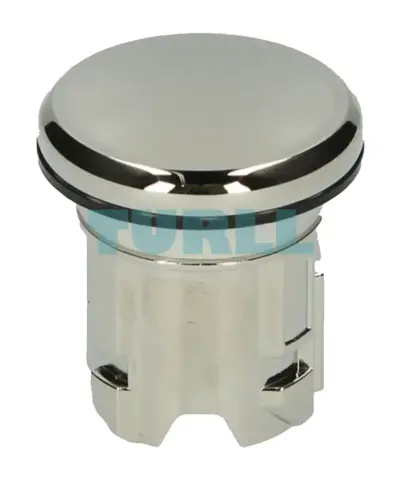
Siemens 3SU1950-0FA80-0AA0 Sealing Plug 22mm Metal, Shiny Silver Original Brand New
3SU1950-0FA80-0AA0
Original price was: $5.65.$2.29Current price is: $2.29.
In stock
Siemens SIMOTION CamTool V4.1 full license license key download floating license for 1 user without software and documentation – – consignee email address required for delivery
SIMOTION SCOUT engineering software (including SCOUT TIA)
Optional packages for SIMOTION SCOUT
Documentation
Other software
Software requirements
Hardware requirements
Minimum system requirements PG/PC for SCOUT:
For an installation of WinCC flexible (ES) integrated in SCOUT, a main memory of 4 GB RAM is recommended.
Use of a programming device or a PC with conventional performance capacity is recommended for processing extensive SIMOTION projects with several modules:
SCOUT TIA always requires that a TIA Portal Framework is installed beforehand using another TIA Portal client (such as: STEP 7, WinCC, Startdrive).
We recommend that the latest update for TIA Portal is always installed.
System requirements for SIMOTION SCOUT TIA V5.X
The system requirements of the TIA Portal or its client (e.g. STEP 7, WinCC, Startdrive) are applicable, because SCOUT TIA can only be installed in parallel with these. Any deviating requirements are described in the currently valid readme file.
The following engineering packages are available to order:
Both delivery versions also include SIMOTION SCOUT TIA as an add-on package for the TIA Portal.
The SCOUT license as well as the SCOUT stand-alone license is valid for SCOUT TIA.
SCOUT stand-alone also includes the components of STEP 7 that are required for SIMOTION SCOUT (SIMATIC CPUs cannot be programmed).
Users who switch over from SCOUT stand-alone to SCOUT (or vice versa) must install new software for the relevant SCOUT version and purchase a new license (the license for SCOUT and SCOUT stand-alone are different).
It is not possible to install SCOUT and SCOUT stand-alone "side by side" on the same PC.
It is possible to install SCOUT TIA and SCOUT (or SCOUT stand-alone) "side by side" on the same PC if the software version is V4.4 or higher. Only one single SCOUT license is required for "side-by-side" installations.
Compatibility list "Software products in the SIMOTION Environment"
A number of additional software products can be used in conjunction with SIMOTION SCOUT. It must be ensured that the corresponding versions of these software products are compatible. Please consult the Compatibility list of software products in the SIMOTION environment.
https://support.industry.siemens.com/cs/document/18857317
SIMOTION Kernel updates are available for the SIMOTION platforms in Siemens Industry Online Support and can then be installed from the PG/PC to the SIMOTION memory cards.
SIMOTION also offers a convenient solution with the device update tool for upgrading SIMOTION devices. SIMOTION D4x5-2 can also be updated using a USB stick.
Siemens SIMOTION CamTool V4.1 full license license key download floating license for 1 user without software and documentation - - consignee email address required for delivery
Visit 6AU1810-0FA41-0XH5
For more our products visit turll.com
| SKU / Model | 6AU1810-0FA41-0XH5 |
|---|---|
| Weight | 0.001 kg |
| Dimensions | 1 × 1 × 1 mm |
Request a quote for project quantities, discontinued or obsolete models, and pro-forma invoice / bank transfer orders. Our sourcing team responds fast.